Data Transfer
⚠️ Data submitted to ARCHIMEDES must comply with applicable privacy regulations and ethical approvals.
➡️ At a minimum, all data must be coded and have the necessary permissions for sharing.
➡️ All direct identifiers (e.g. names, social insurance numbers) are removed and replaced with a unique code, prior to contribution.
➡️ Data can be shared if it is de-identified (or local equivalent). This requires that all direct identifiers and most indirect identifiers must be removed or transformed to reduce the risk of re-identification to a very low level, in accordance with recognized standards and applicable legal and ethical requirements.
⚠️ Researchers are responsible for ensuring their data is prepared appropriately.
➡️ For more information, please refer to the De Identification Resources Hub and the Deidentification Tutorials. This includes structuring the data so it can be processed correctly by ARCHIMEDES (i.e., how the system organizes, validates, and imports data).
💡Tip: Health data may contain direct identifiers (e.g., names, health card numbers, exact addresses), indirect identifiers (e.g., date of birth, postal code, rare diagnoses), or embedded identifiers (e.g., metadata in imaging files or text within images). These elements must be carefully reviewed and either removed or modified to protect privacy.
➡️ According to ARCHIMEDES Data Submission, Date of Birth (DOB) is required as it supports data validation, structuring, and analysis (e.g., age consistency and longitudinal tracking). While the full format YYYY-MM-DD is preferred, users may alternatively provide YYYY-MM or YYYY when full DOB is not available or cannot be shared.
➡️ If the year is not available, users may provide age only. In these cases, the system applies a default setting that calculates a standardized DOB based on the available information (month/year or age) to ensure consistency within the database structure, while still treating DOB as an indirect identifier and maintaining privacy protections.
The sections below outline the recommended workflows and tools for each type of data transfer. Examples are provided at the end.
Small Datasets 🟢
Small Datasets include individual files or modest data volumes size TBD that can be uploaded directly through the ARCHIMEDES, such as images or data files generated by laboratory instruments or analysis software.
- ✅ Ideal for datasets under [size TBD]
- ✅ No data preparation required
- ✅ Upload directly through your browser
- ✅ Simple, easy-to-use workflow
(feature to develop and should be the easiest user test case)
One of the key differences is the permissions associated with these modules and the user role that would be associated with accessing each module.
Below is a screenshot of the various permissions for each module.
there are four key roles that would be associated with imaging tasks.
* 1. MRI expert & LORIS developer: This user would have access to the DICOM Archive and the violated scans to understand more about the imaging ingestion and failures.
* 2. MRI Technologist at the scanning site: This user would have access to the imaging uploader. This is where they would first upload the scan after a session using the imaging uploader -- upload tab, and they can then use the imaging uploader - browse tab to confirm the scan has been transmitted and the processing status.
* 3. Study coordinators: This user would have access to the imaging browser. They need to interact with the scans per se, but it is good for them to be able to confirm that their participants' scans have been uploaded and ingested properly.
* 4. Radiologist and other MRI QC expert: This user would have access to the imaging browser to access the scans at any site & they would also have access to the imaging QC permission to perform quality control on the images.
What is the difference between Imaging Brower and Imaging Uploader browser tab: The imaging uploader - browse tab provides you information about your recent upload, such as the progress of the imaging processing and where files are located. The imaging browser provides you a more general overview for coordinators. No details about the processing steps, but you have the general information of what was ingested and when as well as accessing the images.
What is the difference between the DICOM Archive and the Imaging Uploader Browser tab: The Imaging uploader browse tab provides you with an overview of the processing steps for the file you uploaded. The DICOM Archive keeps a copy of all the files that were submitted to LORIS, whether they were properly inserted in the database or if they faced an issue and were flagged as violated scans.
BIDS Uploader
TBD
ℹ️ Note: Your dataset should be BIDS-compliant.
💡 For more information about the Brain Imaging Data Structure (BIDS) standard format, visit our BIDS Overview resource.
Instrument Manager
Click on Instrument Manager under the Admin tab to view the list of instruments available in ARCHIMEDES. This feature also lets you create new behavioural forms within your ARCHIMEDES database.
A new page will appear giving you the option to browse or upload instruments.
➡️ To browse
- Use the filters to search for an instrument.
- The table will show details about each instrument, including whether it is properly set up in the system.
Browse column descriptions:
- Instrument: Name of the instrument
- Instrument Type: Either PHP or Instrument Builder (LINST file)
- Table Installed: Shows if the instrument’s data table exists (Exists or Missing)
- Table Valid: Indicates if the database is correctly set up for the instrument
- Pages Valid: Indicates if all required instrument pages are properly configured
➡️ To upload
If your ARCHIMEDES account has this feature enabled, you’ll see the Upload tab where you can add new instruments created with the Instrument Builder. * Click Browse to select a LINST file from your computer, * Click Install Instrument to add it to ARCHIMEDES.
ℹ️Note: After installing the instrument, you’ll need to manually assign it to the study before it can be used. This step is done through the back-end system.
Electrophysiology
The Electrophysiology Browser module allows you to review, filter, annotate and download (upload to come) EEG recordings and metadata.
This module allows you to upload EEG recordings and browse past uploads.
In the Browse tab, you can use the Selection Filter section to search for existing uploads.
In the data table, you can click any link in the Upload Location column to download the uploaded files.
To upload recordings, click on the Upload tab. Select your file for upload and enter the required information about the recording.
ℹ️ Note: Your dataset should be BIDS-compliant.
Large Datasets 🔵
Large Datasets involve higher data volumes that are more efficiently transferred in bulk using secure file transfer (SFTP), typically following data preparation steps to ensure integrity and performance.
If you have many files or files larger than TBD MB, follow this process to transfer everything securely and efficiently.
Data preparation
The Principal Investigator (PI) is responsible for preparing the data before submission, ensuring it meets both the project’s specific requirements and the formatting standards required by ARCHIMEDES.
⚠️ Data submitted to ARCHIMEDES must comply with applicable privacy regulations and ethical approvals.
➡️ At a minimum, all data must be Coded Data and have the necessary permissions for sharing.
➡️ All direct identifiers (e.g. names, social insurance numbers) are removed and replaced with a unique code, prior to contribution.
➡️ Data can be shared if it is de-identified (or local equivalent). This requires that all direct identifiers and most indirect identifiers must be removed or transformed to reduce the risk of re-identification to a very low level, in accordance with recognized standards and applicable legal and ethical requirements.
⚠️ Researchers are responsible for ensuring their data is prepared appropriately.
➡️ More information can be found in our De Identification Resources Hub. This includes structuring the data so it can be processed correctly by ARCHIMEDES (i.e., how the system organizes, validates, and imports data).
💡Tip: Health data may contain direct identifiers (e.g., names, health card numbers, exact addresses), indirect identifiers (e.g., date of birth, postal code, rare diagnoses), or embedded identifiers (e.g., metadata in imaging files or text within images). These elements must be carefully reviewed and either removed or modified to protect privacy.
➡️ According to ARCHIMEDES Data Submission, Date of Birth (DOB) is required as it supports data validation, structuring, and analysis (e.g., age consistency and longitudinal tracking). While the full format MM-DD-YYYY is preferred, users may alternatively provide MM-YYYY or YYYY when full DOB is not available or cannot be shared. If the year is not available, users may provide age only. In these cases, the system applies a default setting that calculates a standardized DOB based on the available information (month/year or age) to ensure consistency within the database structure, while still treating DOB as an indirect identifier and maintaining privacy protections.
➡️ Please follow the ARCHIMEDES Data Submission guidelines to ensure your files meet the required structure and format.
Transfer large datasets
🔐 Secure File Transfer (SFTP)
Secure File Transfer Protocol (SFTP) is a secure method for transferring files between your computer and the ARCHIMEDES platform. Unlike standard file transfers, SFTP encrypts both your login credentials and research data during transmission, helping protect sensitive information.
For projects requiring the transfer of large datasets, the ARCHIMEDES team will provide you with access to an SFTP server, along with the required connection details.
This guide describes two methods for transferring data:
- FileZilla (recommended) – A graphical SFTP client suitable for most users.
- Command Line (Terminal) – Intended for users who prefer working in a terminal environment.
🌐 SFTP Connection Details
The ARCHIMEDES team will provide you with the information required to connect to the SFTP server.
| Setting | Value |
|---|---|
| Host | cbigr-ftp-internal-contribution.loris.ca |
| Port | 7515 |
| Protocol | SFTP |
| Username | Your ARCHIMEDES account email address |
| Password | Your ARCHIMEDES account password |
ℹ️ Note: Use the same email address and password that you use to sign in to your ARCHIMEDES account.
🖥️ Option 1 – Using FileZilla (Recommended)
FileZilla is a free, open-source FTP, FTPS, and SFTP client that provides a simple graphical interface for securely transferring files between your computer and the ARCHIMEDES SFTP server. It is available for Windows, macOS, and Linux, and is recommended for most users.
The following steps describe how to connect to the SFTP server and upload your data using FileZilla.
1. Connect to the SFTP Server
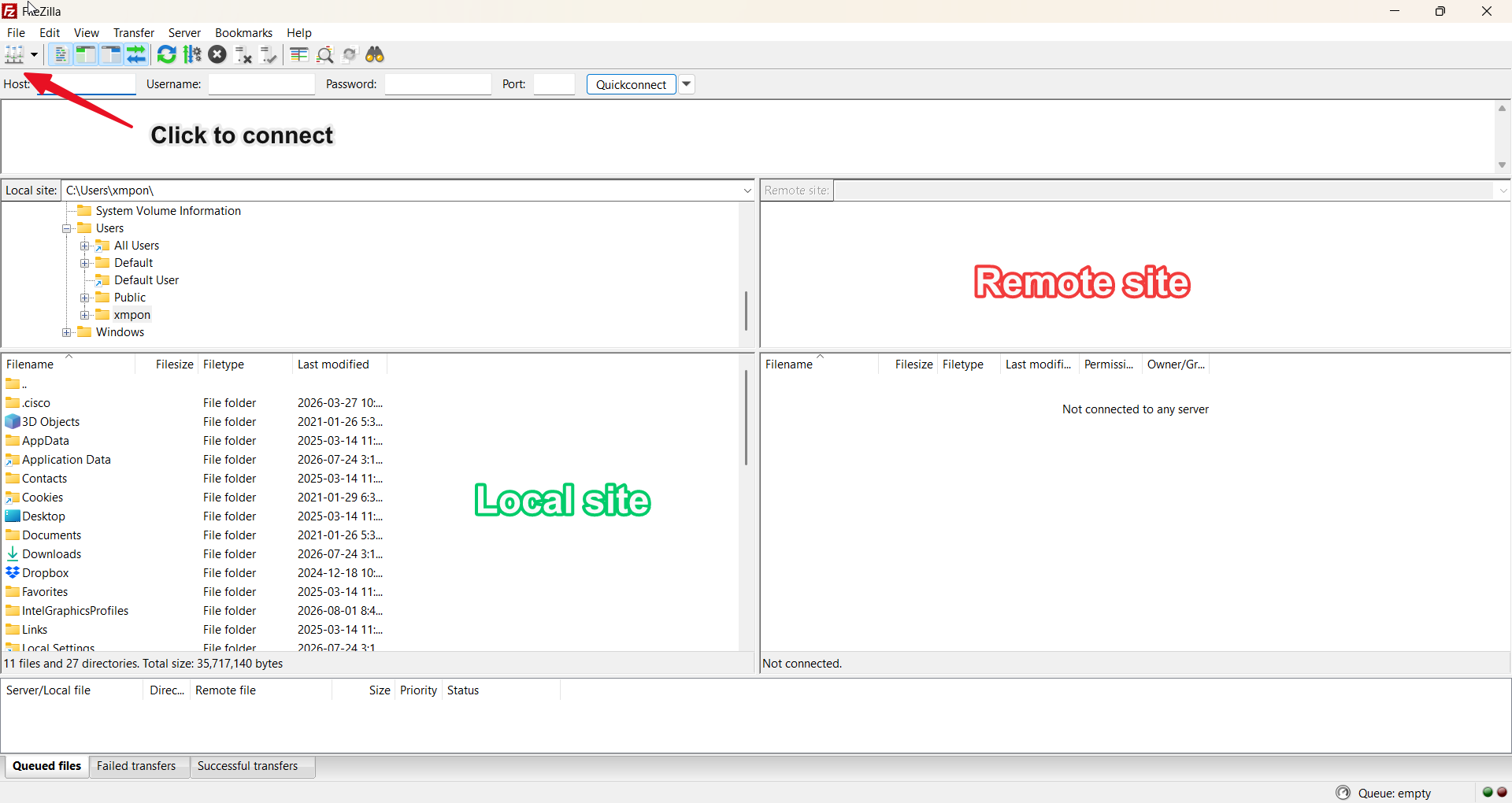
➡️ Open the FileZilla Client. The main window contains two sections:
- Local site – Displays the files and folders on your computer.
- Remote site – Displays the files and folders on the ARCHIMEDES SFTP server after you connect.
➡️ Click the Site Manager icon. A new window will open. where you can enter the SFTP connection details.
➡️ Click New Site, then under the General tab, enter the following information:
- Protocol:
SFTP - SSH File Transfer Protocol - Host:
cbigr-ftp-internal-contribution.loris.ca - Port:
7515 - Logon Type:
Ask for password - User: Your ARCHIMEDES account email address
- Password: Your ARCHIMEDES account password
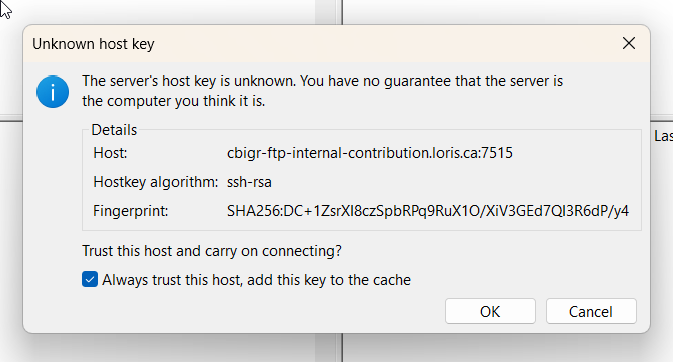
➡️ When you connect to the SFTP server for the first time, FileZilla displays an Unknown host key message.
- Verify that the Host matches the SFTP server address, select Always trust this host, add this key to the cache box and click OK.
- Ensure that the Fingerprint also matches.
2. Upload Files to the Remote Site
Once you are connected:
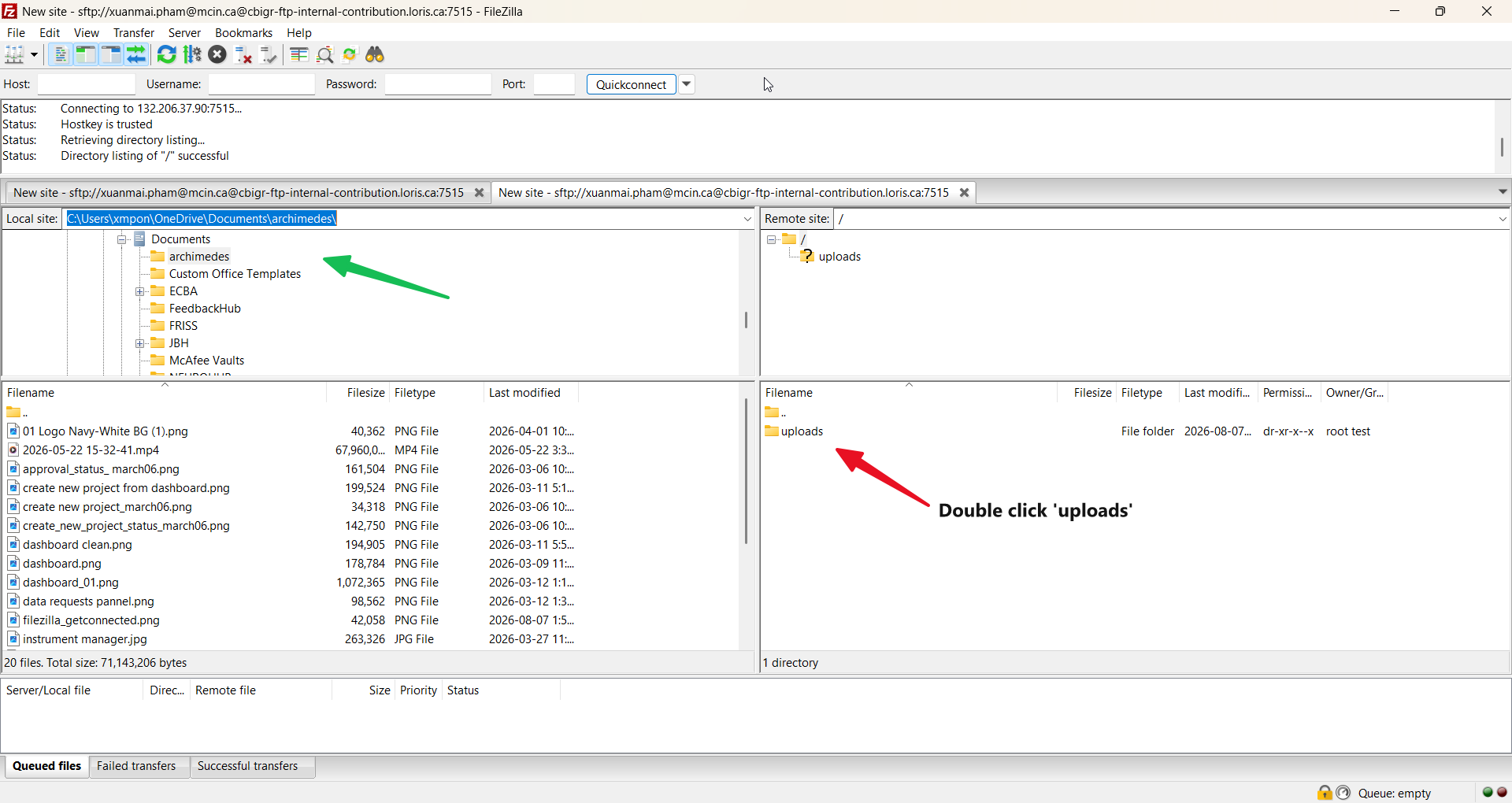
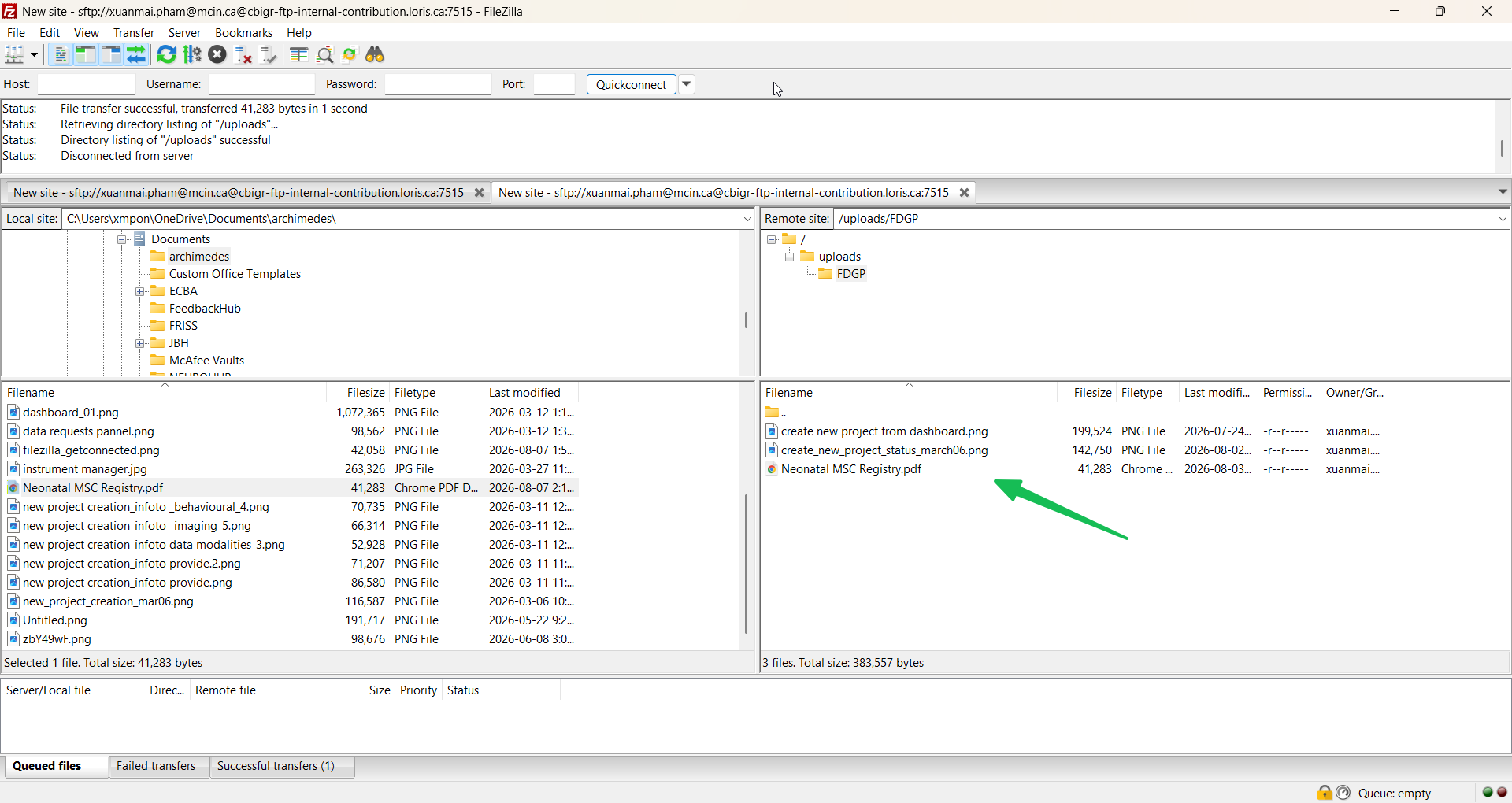
➡️ In the Local site pane (left), navigate to the folder containing the data you want to upload (in this example, the folder is ARCHIMEDES).
➡️ In the Remote site pane (right), the contents of the SFTP server are displayed.
➡️ Double-click the uploads folder to open it.
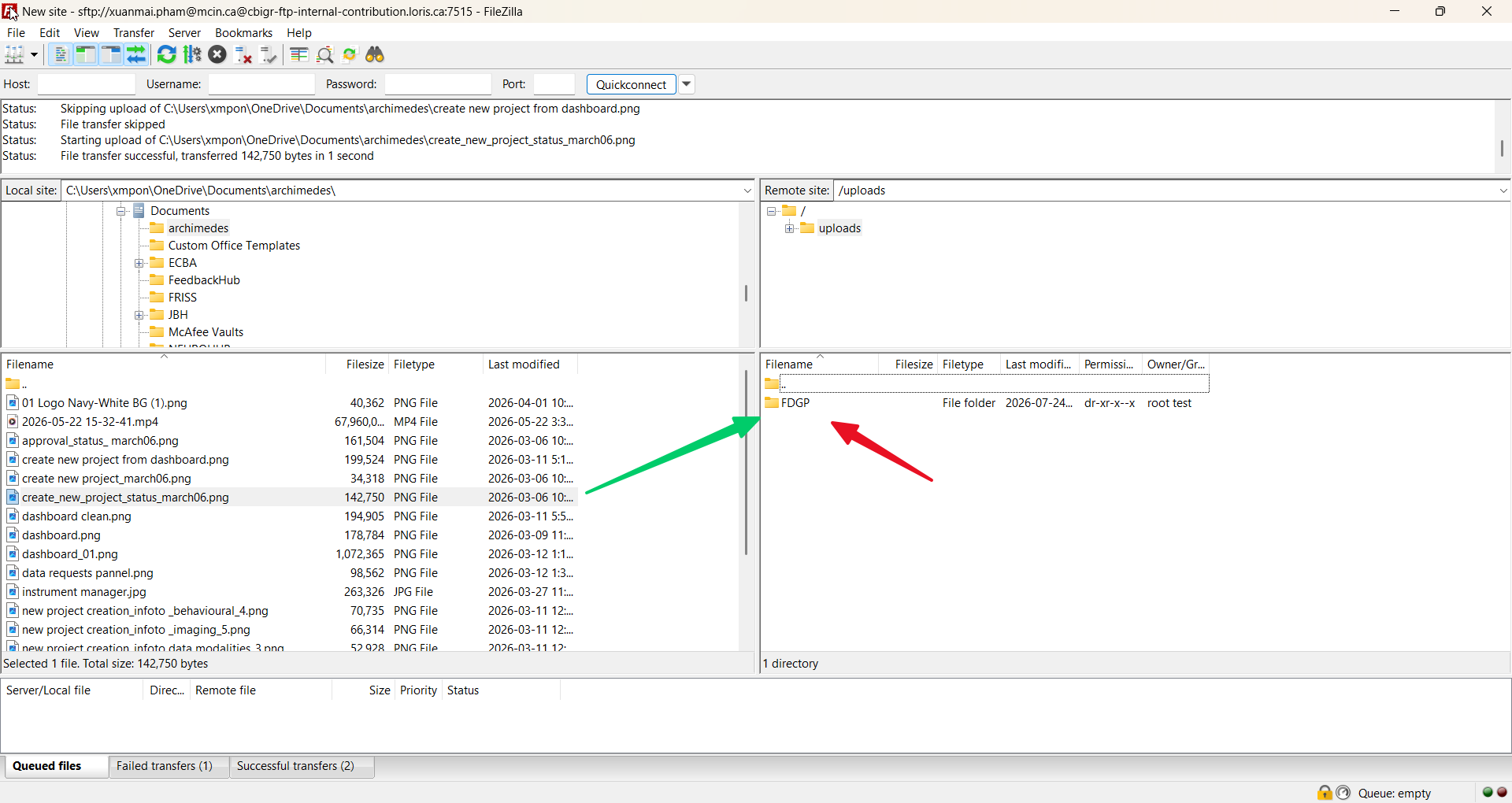
➡️ Each project has its own upload folder. In this example, the data is uploaded to the FDGP folder.
➡️ Upload your data to this folder by dragging and dropping the selected files or folders from the Local site to the Remote site, or by right-clicking the selected item and choosing Upload.
⌨️ Option 2 – Using the Command Line
The command line provides an alternative method for securely transferring files to the SFTP server. This option is intended for users who are comfortable working in a terminal.
1. Connect to the SFTP Server
➡️ Open a terminal (Command Prompt, PowerShell, or Terminal) and run the following command:
sftp -oPort=7515 your_email@example.com@cbigr-ftp-internal-contribution.loris.ca
2. Accept the Host Key (First Connection Only)
➡️ The first time you connect, you may be asked to verify the server's host key.
Are you sure you want to continue connecting (yes/no/[fingerprint])?
➡️ Type:
yes
️️➡️ When prompted, enter your ARCHIMEDES account password.
ℹ️ Note:
Use the same email address and password that you use to sign in to your ARCHIMEDES account.
️️
➡️ Successful connection:
Connected to cbigr-ftp-internal-contribution.loris.ca.
3. Navigate to Your Project Folder
➡️ Go to the uploads directory:
sftp> cd uploads
List the available project folder(s):
sftp> ls
FDGP
Change to the FDGP folder where your data will be uploaded::
sftp> cd FDGP
4. Upload Your Files
➡️ Upload a single file:
sftp> put transfer.txt
A successful upload will display as:
Uploading transfer.txt to /uploads/FDGP/transfer.txt
transfer.txt                                100%   17     2.2KB/s   00:00
➡️ Upload an entire directory:
sftp> put -r foldername
4. Verify the Upload
➡️ List the files in the current remote directory:
sftp> ls
transfer.txt
5. End the SFTP Session
sftp> exit
Custom Assisted Transfer 🛠️
Custom Assisted Transfer is available for more complex or specialized requirements, with support from the ARCHIMEDES team.
Example Workflows 💡
Cardio Neuro Mind Data Platform (CNMDP)
As a CNMDP user, the data originates from a structured database. Data preparation and transfer are handled automatically on the back end through coordination between the CNMDP and ARCHIMEDES technical teams. Researchers are therefore only required to focus on data collection, while the technical teams manage the preparation and secure transfer of the data to the defined project site.
Account creation
Place holder - will CNNDP user create their own account?
Data capture
The CNMDP supports diverse research data types using specialized tools, such as those for behavioral assessments, imaging, and biospecimen tracking. The tools listed below are the most frequently used across studies in the CNMDP.
- REDCap – Behavioral and survey questionnaires; neuropsychological assessments
- LabKey – Biological and biospecimen data management
- XNAT
- Imaging: MRI, CT, PET, fNIRS
- Electrophysiology: EEG, EKG, MEG, eye-tracking
- Wearables – High-frequency time-series data (sensor, wearable, physiological streams)
- Superset
Data preparation
The ARCHIMEDES clinical pipeline automates the process of importing REDCap study data into ARCHIMEDES. It handles instrument installation, candidate and session creation, and data ingestion in a single run. The following must be set up in ARCHIMEDES before running the data ingestion pipeline:
- Project – Your study project must already exist in ARCHIMEDES (e.g., "CNMDP").
- Site – The site where data was collected must already exist in LORIS (e.g., "University of Ottawa Heart Institute", “The Royal/IMHR”).
- Cohort – The participant cohort must exist and be linked to the project (e.g., “Affected,” “Not-Affected,” “Control”)
- Visits – Each REDCap event (e.g., visit_1_arm_1, visit_2_arm_1) must be registered as a visit in LORIS and linked to the project and cohort. The pipeline does not create visit definitions automatically.
All of the above will be created by the ARCHIMEDES technical team on the database.
💡Tip: Health data may contain direct identifiers (e.g., names, health card numbers, exact addresses), indirect identifiers (e.g., date of birth, postal code, rare diagnoses), or embedded identifiers (e.g., metadata in imaging files or text within images). These elements must be carefully reviewed and either removed or modified to protect privacy.
➡️ According to ARCHIMEDES Data Submission, Date of Birth (DOB) is required as it supports data validation, structuring, and analysis (e.g., age consistency and longitudinal tracking). While the full format MM-DD-YYYY is preferred, users may alternatively provide MM-YYYY or YYYY when full DOB is not available or cannot be shared.
If the year is not available, users may provide age only. In these cases, the system applies a default setting that calculates a standardized DOB based on the available information (month/year or age) to ensure consistency within the database structure, while still treating DOB as an indirect identifier and maintaining privacy protections.
➡️ Data preparation by CNMDP technical team
The files will be placed in the expected folder structure:
{base_path}/{ProjectName}/
├── project.json
├── deidentified-raw/
│   └── clinical/
│       └── redcap_data.csv
├── documentation/
│   └── data_dictionary/
│       └── data_dict.csv
│
➡️ Data Dictionary File (documentation/data_dictionary/)
This is the REDCap data dictionary exported from your REDCap project. It defines all the instruments and their fields. The pipeline will use it to install instruments into ARCHIMEDES automatically.
➡️ For reference, visit the ARCHIMEDES Data Ingestion guidelines for behavioural data.
Data transfer
To prepare data for ingestion into ARCHIMEDES, the data must be structured according to the specifications defined by the ARCHIMEDES ingestion pipelines (available as a reference). Each data type (e.g., imaging, behavioural, biospecimen...) must be prepared separately and follow the specific formatting requirements for that data type.
Data ingestion refers to the process of importing and organizing the data within the ARCHIMEDES platform so that it can be securely stored, managed, and accessed. This step is managed by the CNMDP and ARCHIMEDES technical teams and is therefore transparent to the user. No action is required from the user at this stage.
University of Ottawa Heart Institute (UOHI)
Data preparation
The Principal Investigator (PI) is responsible for preparing the data before submission, ensuring it meets both the project’s specific requirements and the formatting standards required by ARCHIMEDES. Data submitted to ARCHIMEDES must comply with applicable privacy regulations and ethical approvals. In many cases this involves de-identifying or coding data with consent prior to submission, i.e that any information that could directly or indirectly identify an individual (such as names, IDs, or contact details) has been removed or replaced. More information can be found in our De Identification Resources Hub. This includes structuring the data so it can be processed correctly by ARCHIMEDES (i.e., how the system organizes, validates, and imports data).
➡️ Please follow the ARCHIMEDES Data submission guidelines to ensure your files meet the required structure and format.
UOHI Data De-identification control and transfer process
The following section outlines the process for transferring data to ARCHIMEDES through UOHI. The workflow involves coordination between the Principal Investigator (PI), ARCHIMEDES, and UOHI teams to ensure data is securely reviewed, de-identified, and ingested.
➡️ Step 1: Project Setup (PI) 👤
- Set up your project in ARCHIMEDES before initiating any data transfer
- Confirmed you are on the approved PI list from UOHI
- Create your ARCHIMEDES account
- Create a new project
- Complete and submit the Data Contribution Form (DCF)
- Wait for DACO approval
- Create your project in ARCHIMEDES by providing all required information
➡️ Step 2: Data Request & Review (ARCHIMEDES → UOHI) 📨
- ARCHIMEDES initiates the data request based on your project information
- ARCHIMEDES submits the Data Request Form to the UOHI Privacy Office
- The Privacy Office reviews the request
- Once approved, you will be contacted by the Privacy team to grant access to your data location
ℹ️ Note: Data analytics review is not required for pre-clinical data ingestion.
➡️ Step 3: De-identification (UOHI) 🔐
- Your data is reviewed and prepared to meet privacy requirements
- De-identification is processed from the granted access data storage location
- Your data is reviewed by the appropriate team:
- Imaging data → UOHI IT
- Behavioral / clinical data/ non imaging data → UOHI Privacy Team
- A final verification ensures all data is properly de-identified
➡️ Step 4: Data Transfer & Ingestion in ARCHIMEDES 📤
- Your data is securely transferred and made available in ARCHIMEDES
- Approved data are uploaded to the designated shared drive either by UOHI IT, UOHI Privacy, or the UOHI ARCHIMEDES team)
- ARCHIMEDES accesses the data directly (no duplication required)
- Data is ingested according to your project specifications